If a device is not appearing in the Intune console, you can speed up the process of enrollment by
Creating a script which creates the MDM Enrollment URL’s:
# Set MDM Enrollment URL's

$key = 'SYSTEM\CurrentControlSet\Control\CloudDomainJoin\TenantInfo\*'
$keyinfo = Get-Item "HKLM:\$key"
$url = $keyinfo.name
$url = $url.Split("\")[-1]
$path = "HKLM:\SYSTEM\CurrentControlSet\Control\CloudDomainJoin\TenantInfo\$url"

New-ItemProperty -LiteralPath $path -Name 'MdmEnrollmentUrl' -Value 'https://enrollment.manage.microsoft.com/enrollmentserver/discovery.svc' -PropertyType String -Force -ea SilentlyContinue;
New-ItemProperty -LiteralPath $path  -Name 'MdmTermsOfUseUrl' -Value 'https://portal.manage.microsoft.com/TermsofUse.aspx' -PropertyType String -Force -ea SilentlyContinue;
New-ItemProperty -LiteralPath $path -Name 'MdmComplianceUrl' -Value 'https://portal.manage.microsoft.com/?portalAction=Compliance' -PropertyType String -Force -ea SilentlyContinue;
forcing a autoenrollment via nt-authority\system user:
PS C:\WINDOWS\system32> psExec.exe -i -s powershell.exe

PS C:\WINDOWS\system32> whoami
nt-autorität\system


PS C:\WINDOWS\system32> C:\Windows\system32\deviceenroller.exe /c /AutoEnrollMDM
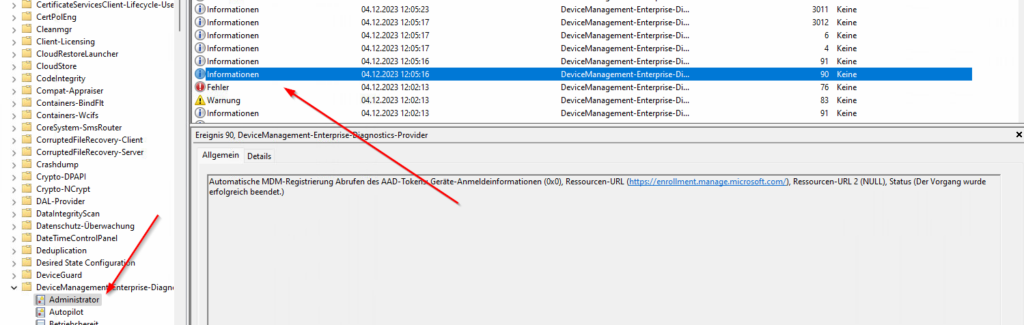
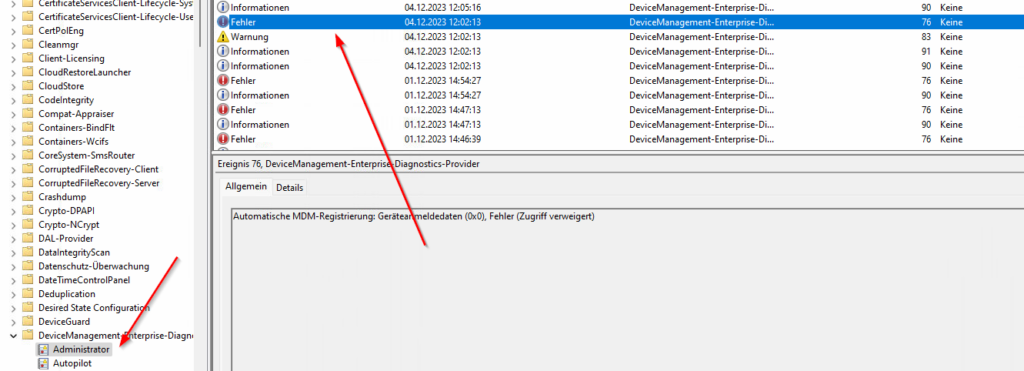
this will create and execute the enrollment immediately. check it in the event viewer.
before:
afterwards